RMVB
Definition: abbreviation for Real
Media variable bitrate created by
RealNetworks.
RV stands for Real video.
1. convert rmvb to mp3, please
install the latest
RealPlayer if your Windows has
not installed it. Download
RealMedia Splitter, unzip the file with WinRAR, use the command
line "regsvr32 RealMediaSplitter.ax"
to register it.
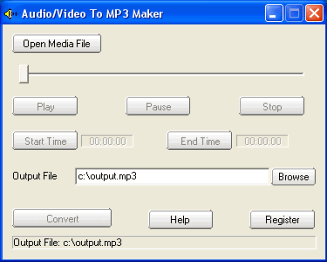
2 Launch "audio/video to MP3 maker",
click the Open Media File button,
select a rmvbor rv file.
3. If you want to convert the whole
audio from the rmvb file, set the
Output File if needed, then click
the convert button.
If you want to convert some part of
audio from the rmvb file, drag the
slide bar directly, or click the
Play button to preview the media
file, set the Start Time and the End
Time. At last, click the convert
button to start to convert rmvb to
mp3.
3IVX stands for a kind of commercial
MPEG4 codec filter that supports
MPEG-4 video and audio with file
extension *.MP4 File Format. It is
created by 3ivx Technologies.
If you want to convert 3ivx to mp3,
Please install 3ivx Directshow
decoder/filter. |
