Definition of RMI: A type of MIDI
file with RIFF format created by
Microsoft. The MCI RMI sequencer
plays standard MID files and
resource interchange file format
(RIFF) MIDI files, known as RMID
files.
SMF is Standard MIDI File. DLS is
Downloadable sounds Level.
1. convert rmi to mp3, Launch RMI to
MP3 MAKER, click the Open button,
select a RMI file.
2. Change the output name if
necessary, which must be an MP3
file. Or click the Browse button to
name the file in a directory.
3. Then click the convert button,
the conversion will start. Please
make sure you can hear normal sound
volume of the RMI file when
converting, otherwise check Windows
Volume Control.
4. After convert rmi to mp3, click
the Play button to listen to the MP3
file with Windows Media Player.
Before start the next conversion,
please exit Windows Media Player.
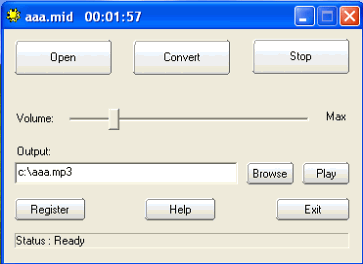
5. If you feel the output MP3 volume
is smaller or louder or distorted,
adjust the volume control of the
program, or "Volume control" or
"Wave" of Windows Volume Control.
Then start conversion again. Try
several times, you will get the
appropriate output volume. |
