|
RM
Definition: RealMedia format created
by RealNetworks Inc to store
multimedia file.
1. convert rm to mp3, pease install
the latest
RealPlayer if your Windows has
not installed it. Download
RealMedia Splitter, unzip the file with WinRAR, use the command
line "regsvr32 RealMediaSplitter.ax"
to register it.
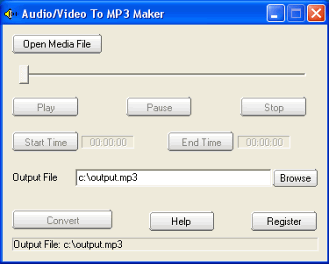
2 Launch "audio/video to MP3 maker",
click the Open Media File button,
select a rm file.
3. If you want to convert the whole
audio from the rm file, set the
Output File if needed, then click
the convert button.
If you want to convert some part of
audio from the rm file, drag the
slide bar directly, or click the
Play button to preview the media
file, set the Start Time and the End
Time. At last, click the convert
button to start to convert rm to
mp3.
Ram is Real audio metafile.
Metafiles are text files which
contain the URL location of a .ra
(realaudio file). Realaudio files
normally do not be used directly in
the html file because ra files can
be downloaded before playback. If
you want to convert ram to mp3, it
is hard job.
|
