WMV
Definition: Windows Media video.
1. convert wmv to mp3, please
install the latest
Windows Media Player
which includes the latest wmv
decoder.
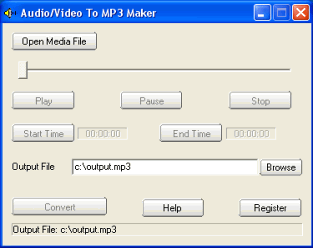
2 Launch "audio/video to MP3 maker",
click the Open Media File button,
select a wmv file.
3. If you want to convert the whole
audio from the wmv file, set the
Output File if needed, then click
the convert button.
If you want to convert some part of
audio from the wmv file, drag the
slide bar directly, or click the
Play button to preview the media
file, set the Start Time and the End
Time. At last, click the convert
button to start to convert wmv to
mp3.
WVX is Windows Media video
Redirector. If you want to convert
wvx to mp3, it is hard job.
AVS is Chinese video and audio
standard to compress digital movie. |
