SVCD
Definition: Super VCD.
1. convert svcd to mp3, please
install DVD players such as WinDVD
Player or PowerDVDPlayer, which
include the appropriate SVCD
decoder.
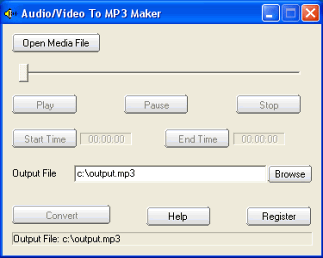
2 Launch "audio/video to MP3 maker",
click the Open Media File button.
After you insert the SVCD into the
CD/DVD drive, you will find the
directory named MPEG2 in the SVCD.
In the directory, there are some
SVCD files named AVSEQ01.MPG,
AVSEQ02.MPG, or MUSIC01.MPG,
MUSIC02.MPG etc. Then open the file
in the program.
3. If you want to convert the whole
audio from the svcd file, set the
Output File if needed, then click
the convert button.
If you want to convert some part of
audio from the svcd file, drag the
slide bar directly, or click the
Play button to preview the media
file, set the Start Time and the End
Time. At last, click the convert
button to start to convert svcd to
mp3.
HDTV means High-Definition
Television. HDTV broadcasts
digitally television signals with a
higher resolution (1920 x 1080) than
DVD, NTSC, SECAM, PAL, DVB.
Except for early analog formats in
Europe and Japan. HDTV compresses
video with mpeg2, transfer audio
with Layer 2 audio or digital Dolby
AC-3.
Please install HDX4 HDTV codec or
other codecs to convert HDTV to mp3.
DVB means Digital video
Broadcasters. |
