MPEG
Definition: Moving Pictures Expert
Group. A kind of multimedia file
format and standard for compressing
image and sound.
1. convert mpeg to mp3: If the MPEG
file is encoded with MPEG-1 format,
you do not need to install any
additional MPEG decoder. If the file
is encoded with MPEG 1.1 or 2.0,
please install the appropriate dvd
player such as PowerDVD Player or
WinDVD Player for the mpeg decoder.
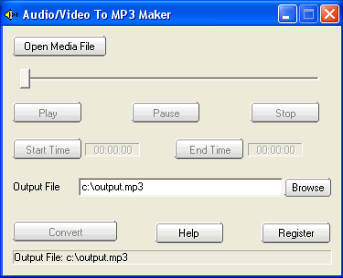
2 Launch "audio/video to MP3
maker",click the Open Media File
button, select an mpeg file.
3. If you want to convert the whole
audio from the mpeg file, set the
Output File if needed, then click
the convert button.
If you want to convert some part of
audio from the mpeg file, drag the
slide bar directly, or click the
Play button to preview the media
file, set the Start Time and the End
Time. At last, click the convert
button to start to convert mpeg to
mp3.
Flash (formerly Macromedia Flash) is
created by Adobe System company. It
can edit content of animation,
movie, music, and games on World
Wide Web. Swf is ShockWave Flash.
The converter does not convert flash
to mp3 directly. Launch Easy MP3
sound recorder, run Flash player or
Internet Explorer to preview or
pre-listen the flash file swf,
record sound track of the swf to
extract or convert swf to mp3. |
