WMA
Definition: Windows Media audio file
format created by Microsoft Inc.
1. convert wma to mp3, please
install the latest
Windows Media Player
which includes the latest wma
decoder.
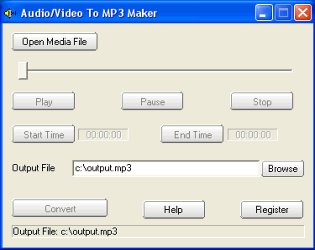
2 Launch "audio/video to MP3 maker",
click the Open Media File button,
select a wma file.
3. If you want to convert the whole
audio from the wma file, set the
Output File if needed, then click
the convert button.
If you want to convert some part of
audio from the wma file, drag the
slide bar directly, or click the
Play button to preview the media
file, set the Start Time and the End
Time. At last, click the convert
button to start to convert wma to
mp3.
Ringtone or Ring tone is customized
sounds available on cell phones.
MMF is The file extension for SMAF
(Synthetic music Mobile Application
Format), which is common as
ringtones for mobile phones with one
of five music chips. The file format
is similar with MID format.
If you want to convert Ringtone/MMF
to mp3, please use a player to
playback SMAF file, record the audio
to mp3 with "Easy MP3 sound
recorder". |
