MPEG4
(MPEG-4) Definition: Moving Picture
Experts Group Version 4.
1. convert mpeg4 to mp3, please
install the appropriate
mpeg4 decoder
and audio decoder based on Microsoft
DirectShow.
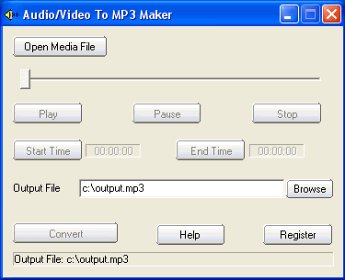
2 Launch "audio/video to MP3
maker",click the Open Media File
button, select an mpeg4 file.
3. If you want to convert the whole
audio from the mpeg4 file, set the
Output File if needed, then click
the convert button.
If you want to convert some part of
audio from the mpeg4 file, drag the
slide bar directly, or click the
Play button to preview the media
file, set the Start Time and the End
Time. At last, click the convert
button to start to convert mpeg4 to
mp3.
3GPP2 means The Third Generation
Partnership Project 2: 3GPP2 is a
collaborative third generation (3G)
telecommunications
specifications-setting project, and
comprising North American and Asian
interests developing global
specifications for 3G. 3GPP2 is
global specifications for the radio
transmission technologies (RTTs).
If you want to covnert 3GPP2 to mp3
or 3g2 to mp3, please install HDX4
codec or FFDSHOW. |
